 投稿者:
投稿者: 
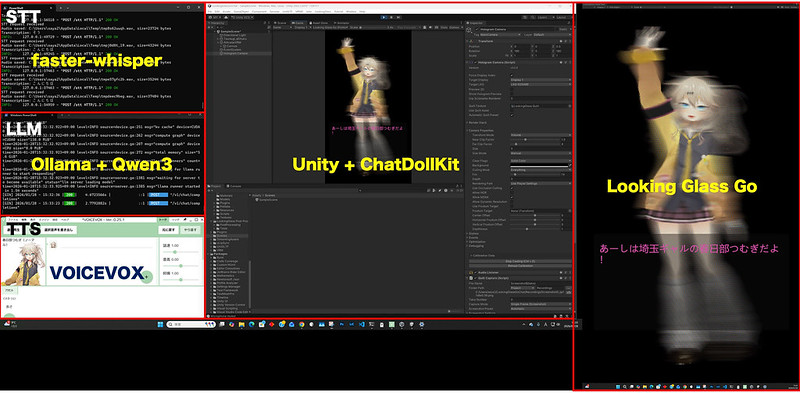
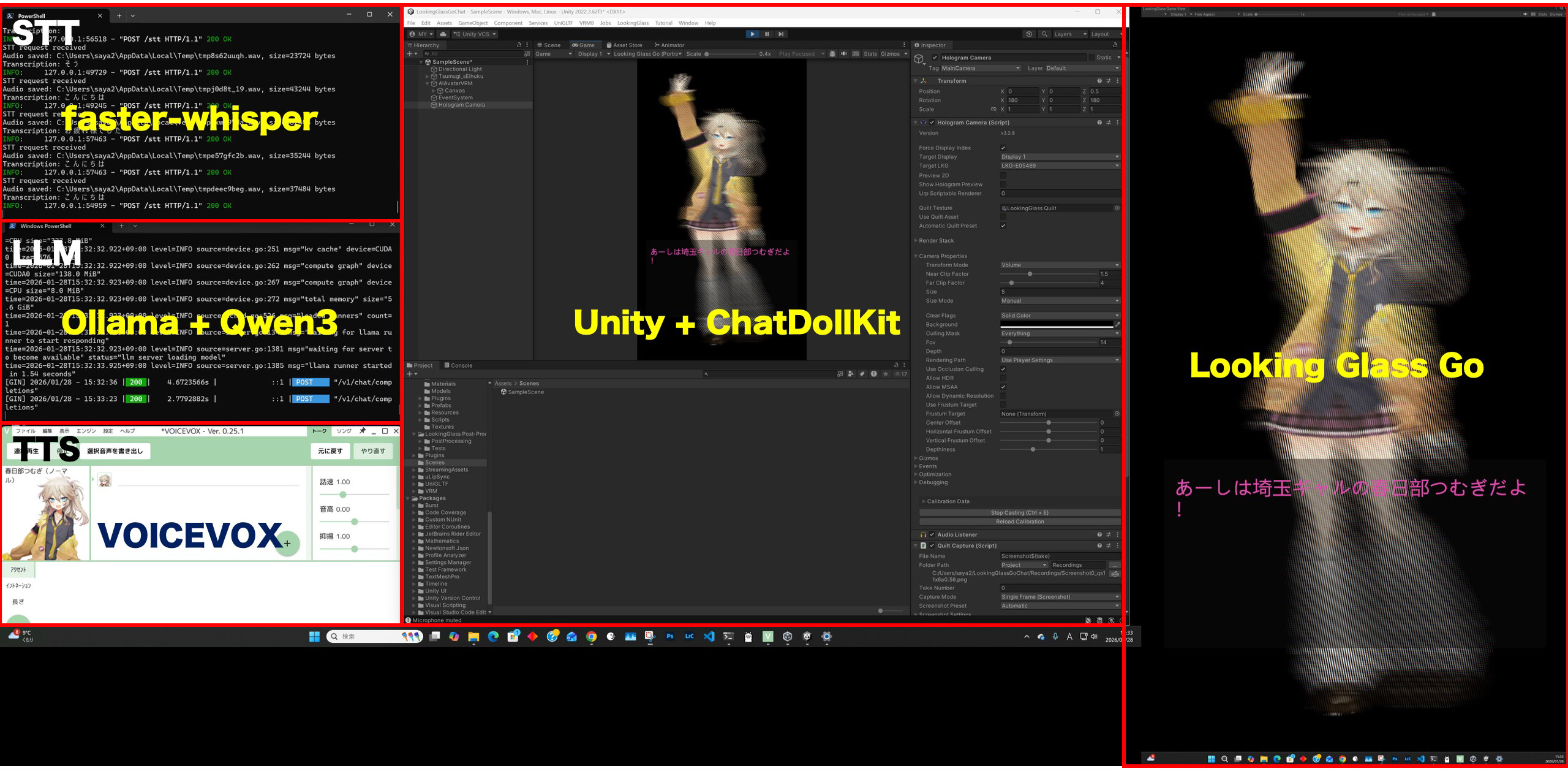
以前、Looking Glass Goを使って、ホログラム表示したキャラクターと会話するというのを試しました。このときはOpenAIのSTT(Speach to Text )とChatGPTを使っていましたが、今回は、STTもLLMもローカル(RTX5070Ti搭載Windows PC)で動かして、ネットワークや有料サービスを使わずにスタンドアロン動作させることにチャレンジしてみました。
LLM : Ollama + Qwen3
まずはLLMをローカルで動かして、Web APIでアクセス可能にします。ローカルで簡単にLLMを動かす仕組みとしてはOllamaやLM Studioがあります。今回はOllamaをインストールしました。
https://ollama.com から Windows用のインストーラーをダウンロードしてインストール。
Powershelllで、ollama run [モデル名]で、モデルをダウンロードしてテストすることができます。
モデルは、軽量で高性能な qwen3:8b にしてみました。
少し重めですが、gpt-oss:20b(o4-mini 相当)や qwen3-vl:30b(マルチモーダルAI)も試したら動きました(VRAM利用量が大きいので、今回の用途には向きませんが)。
ollama serve で、OpenAI互換サーバがポート番号11434で立ち上がります。
ブラウザで、http://localhost:11434/api/tagsにアクセスして、モデルのリストがJSON形式で返ってくればOKです。
ただ、アプリ側でも立ち上げて競合したりするので、Ollamaアプリの常駐は停止、自動起動も停止しておいた方が良いです。
せっかくだから、ローカル以外からもアクセス可能にするには、
setx OLLAMA_HOST 0.0.0.0:11434
してから、サーバを立ち上げればOK
STT: faster-whisper
Powershellで下記を実行します。(要Pythonインストール)
python -m venv whisper_env
.\whisper_env\Scripts\activate
pip install --upgrade pip
pip install faster-whisper
pip install torch torchvision torchaudio --index-url https://download.pytorch.org/whl/cu121
pip install fastapi uvicorn soundfile python-multipart
下記をstt_server.pyとして保存します。
from fastapi import FastAPI, UploadFile, File
from faster_whisper import WhisperModel
import tempfile

app = FastAPI()

model = WhisperModel(
    "large-v3",
    device="cuda",
    compute_type="float16"
)

@app.post("/stt")
async def stt(audio: UploadFile = File(...)):
    with tempfile.NamedTemporaryFile(delete=False, suffix=".wav") as tmp:
        tmp.write(await audio.read())
        tmp_path = tmp.name

    segments, _ = model.transcribe(tmp_path, language="ja")

    text = "".join([seg.text for seg in segments])
    return {"text": text}
下記でサーバを起動します。
uvicorn stt_server:app --host 0.0.0.0 --port 8001ブラウザで http://localhost:8001/docs にアクセスして、起動確認。
ChatDollKit
下記記事を参考にChatDollKitとLookingGlassGoを設定します。ChatDollKi v.8.0.5では少し構成が変わっているので、読み替えます。
TTS(Text to Speech)もこちらを参考にローカルのVOICEVOXを使います。
https://qiita.com/yasubehe/items/7a7c3d4f032aaf308df1
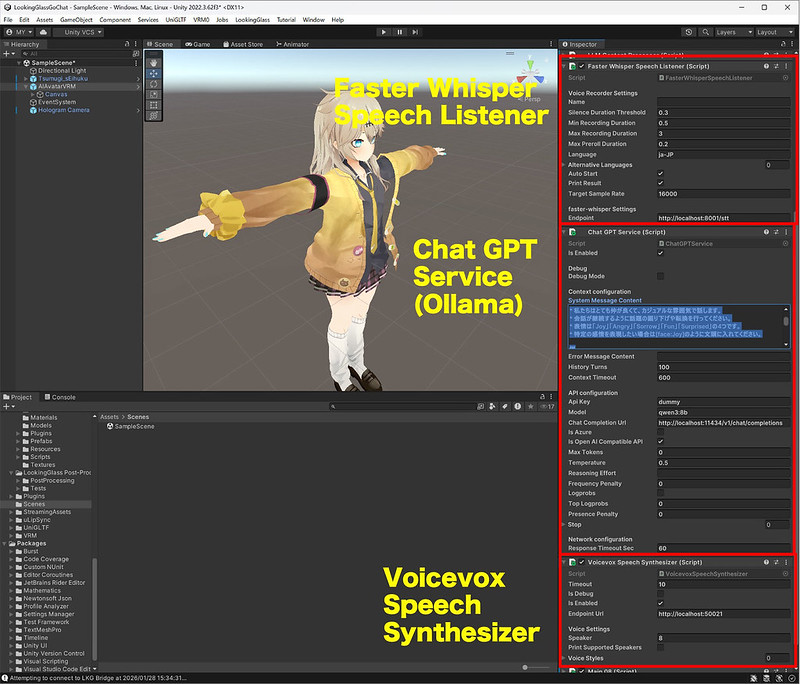
下記2つのファイルを作成して、Assetに配置し、AIAvatarVRMのInspectorに追加します。元のOpenAI Speech ListnerやChatGPT Serviceは削除します。FasterWhisperSpeechListenerのTarget Sample Rateは16000にしています。
FasterWhisperSpeechListener.cs
using System;
using System.Threading;
using UnityEngine;
using UnityEngine.Networking;
using Cysharp.Threading.Tasks;

namespace ChatdollKit.SpeechListener
{
    public class FasterWhisperSpeechListener : SpeechListenerBase
    {
        [Header("faster-whisper Settings")]
        public string Endpoint = "http://localhost:8001/stt";

        protected override async UniTask<string> ProcessTranscriptionAsync(
            float[] samples,
            int sampleRate,
            CancellationToken token)
        {
            if (string.IsNullOrEmpty(Endpoint))
            {
                Debug.LogError("Endpoint is missing for FasterWhisperSpeechListener");
                return string.Empty;
            }

            // Audio → WAV (PCM)
            byte[] wavData = SampleToPCM(samples, sampleRate, 1);

            WWWForm form = new WWWForm();
            form.AddBinaryData(
                "audio",
                wavData,
                "voice.wav",
                "audio/wav"
            );

            using (UnityWebRequest request = UnityWebRequest.Post(Endpoint, form))
            {
                try
                {
                    await request.SendWebRequest().ToUniTask(cancellationToken: token);
                }
                catch (Exception ex)
                {
                    Debug.LogError($"Error sending request to {Endpoint}: {ex.Message}");
                    return string.Empty;
                }

                if (request.result != UnityWebRequest.Result.Success)
                {
                    Debug.LogError($"STT failed: {request.error}");
                    return string.Empty;
                }

                // faster-whisper FastAPI response: { "text": "..." }
                var json = request.downloadHandler.text;
                var result = JsonUtility.FromJson<WhisperResponse>(json);

                return result != null ? result.text : string.Empty;
            }
        }

        [Serializable]
        private class WhisperResponse
        {
            public string text;
        }
    }
}
ChatGPTService.cs
using System;
using System.Collections.Generic;
using System.Linq;
using System.Threading;
using UnityEngine;
using UnityEngine.Networking;
using Cysharp.Threading.Tasks;
using Newtonsoft.Json;

namespace ChatdollKit.LLM.ChatGPT
{
    public class ChatGPTService : LLMServiceBase
    {
        [Header("API configuration")]
        public string ApiKey = "dummy";
        public string Model = "qwen3:8b";
        public string ChatCompletionUrl = "http://localhost:11434/v1/chat/completions";
        public bool IsAzure;
        public bool IsOpenAICompatibleAPI = true;
        public int MaxTokens = 0;
        public float Temperature = 0.5f;
        public string ReasoningEffort;
        public float FrequencyPenalty = 0.0f;
        public bool Logprobs = false;
        public int TopLogprobs = 0;
        public float PresencePenalty = 0.0f;
        public List<string> Stop;

        [Header("Network configuration")]
        [SerializeField] protected int responseTimeoutSec = 60;

        protected override void UpdateContext(LLMSession llmSession)
        {
            var lastUserMessage = llmSession.Contexts.Last();
            context.Add(lastUserMessage);

            var assistantMessage = new ChatGPTAssistantMessage(llmSession.StreamBuffer);
            context.Add(assistantMessage);

            contextUpdatedAt = Time.time;
        }

#pragma warning disable CS1998
        public override async UniTask<List<ILLMMessage>> MakePromptAsync(
            string userId,
            string inputText,
            Dictionary<string, object> payloads,
            CancellationToken token = default)
        {
            var messages = new List<ILLMMessage>();

            if (!string.IsNullOrEmpty(SystemMessageContent))
            {
                messages.Add(new ChatGPTSystemMessage(SystemMessageContent));
            }

            messages.AddRange(GetContext(historyTurns * 2));
            messages.Add(new ChatGPTUserMessage(inputText));

            return messages;
        }
#pragma warning restore CS1998

        public override async UniTask<ILLMSession> GenerateContentAsync(
            List<ILLMMessage> messages,
            Dictionary<string, object> payloads,
            bool useFunctions = true,
            int retryCounter = 1,
            CancellationToken token = default)
        {
            var session = new ChatGPTSession
            {
                Contexts = messages,
                ContextId = contextId
            };

            await StartRequestAsync(session, token);
            return session;
        }

        private async UniTask StartRequestAsync(ChatGPTSession session, CancellationToken token)
        {
            var data = new Dictionary<string, object>
            {
                { "model", Model },
                { "messages", session.Contexts },
                { "temperature", Temperature },
                { "stream", false }
            };

            if (MaxTokens > 0) data["max_tokens"] = MaxTokens;
            if (Stop != null && Stop.Count > 0) data["stop"] = Stop;

            using var request = new UnityWebRequest(ChatCompletionUrl, "POST");
            request.timeout = responseTimeoutSec;
            request.SetRequestHeader("Content-Type", "application/json");

            if (!string.IsNullOrEmpty(ApiKey))
            {
                request.SetRequestHeader("Authorization", "Bearer " + ApiKey);
            }

            request.uploadHandler = new UploadHandlerRaw(
                System.Text.Encoding.UTF8.GetBytes(JsonConvert.SerializeObject(data))
            );
            request.downloadHandler = new DownloadHandlerBuffer();

            await request.SendWebRequest();

            if (request.result != UnityWebRequest.Result.Success)
            {
                Debug.LogError($"LLM error: {request.error}");
                session.ResponseType = ResponseType.Error;
                return;
            }

            var responseText = request.downloadHandler.text;

            if (DebugMode)
            {
                Debug.Log($"LLM raw response:\n{responseText}");
            }

            try
            {
                var json = JsonConvert.DeserializeObject<Dictionary<string, object>>(responseText);
                var choices = json["choices"] as Newtonsoft.Json.Linq.JArray;
                var content = choices[0]["message"]["content"]?.ToString();

                session.StreamBuffer = content;
                session.CurrentStreamBuffer = content;
                session.ResponseType = ResponseType.Content;
                session.IsResponseDone = true;

                UpdateContext(session);
            }
            catch (Exception e)
            {
                Debug.LogError($"Parse error: {e}\n{responseText}");
                session.ResponseType = ResponseType.Error;
            }
        }
    }

    // ===== Messages =====

    public class ChatGPTSession : LLMSession { }

    public class ChatGPTSystemMessage : ILLMMessage
    {
        public string role { get; } = "system";
        public string content { get; set; }
        public ChatGPTSystemMessage(string content) { this.content = content; }
    }

    public class ChatGPTUserMessage : ILLMMessage
    {
        public string role { get; } = "user";
        public List<IContentPart> content { get; set; }

        public ChatGPTUserMessage(string text)
        {
            content = new List<IContentPart> { new TextContentPart(text) };
        }
    }

    public class ChatGPTAssistantMessage : ILLMMessage
    {
        public string role { get; } = "assistant";
        public string content { get; set; }

        public ChatGPTAssistantMessage(string content)
        {
            this.content = content;
        }
    }

    // ===== Content Parts =====

    public interface IContentPart
    {
        string type { get; }
    }

    public class TextContentPart : IContentPart
    {
        public string type { get; } = "text";
        public string text { get; set; }
        public TextContentPart(string text) { this.text = text; }
    }
}
上記、ファイルはChatGPTが作成したものなので正しいか分かりませんが、OllamaのStreaming形式はOpenAI互換ではないとかで、Streamingではない形式に変更しています。
紆余曲折あったものの、とりあえず動きました!それぞれのサーバが動いている様子を確認できました。
ビルドして実行。
動画ではLooking Glass Goの立体感が伝わらないですが、なかなか面白いです。プロンプトを変えてもっと役にたつエージェントにすればより面白そう。
関連投稿:
 Looking Glass Go で AI会話できるMMDモデルをホログラム表示 #ChatGPT #ChatdollKit #VOICEVOX #LookingGlassGo
 DeepSeek-R1+Ollama+VSCode+Roo Code Macローカル で 生成AI活用プログラミング #生成AI #DeepSeek #LLM
 Apple M1 MacBook Pro LLM(GGUF)がGPUを使って高速に #ChatGPT #LLM #textgenerationwebui
 スマホサイズのコンパクトなホログラフィック空間ディスプレイ「Looking Glass Go」のクラウドファンディング開始 #LookingGlassGo
ピンバック: Sunoライクな楽曲生成AI HeartMuLa Studio / Qwen マルチアングル生成 / Wan2.2 S2V で ローカルPC で MV生成 #生成AI | Digital Life Innovator